Jump to HeaderJump to Main ContentJump to Footer
Michigan State University
College of Law
  • Current Students
  • Faculty & Staff
  • Alumni
  • Apply
  • Give
  • Hire

College of Law

  • About
    • Overview
    • Why MSU Law
    • History
    • Faculty & Staff Directory
    • Campus Map
    • Office of the Dean
    • The Gavel
    • Request for Dean's Attendance
    • Strategic Plan
    • Admissions
    • Registrar
    • Shop MSU Law
    • Visit MSU Law

    Find opportunities at MSU College of Law

    Apply
  • |
  • Academics
    • Overview
    • Degrees & Programs
    • JD Degree Programs
    • Concurrent Degree Programs
    • Masters & Non-Degree Programs
    • Core Curricular Strengths
    • LEAD In Social Justice
    • LEAD in Innovation and Entrepreneurship
    • LEAD in Business and Regulatory Law
    • Experiential Learning
    • Course Descriptions
    students-lobby-library

    John F. Schaefer

    Law Library
  • |
  • Admissions
    • Overview
    • Why MSU Law
    • Life at MSU
    • Cost & Aid
    • Visit MSU Law
    • Preparing for Law School
    • Apply
    • Connect MSU Law
    Gennara_Spring2020_Sparty_004

    Become a Spartan Lawyer

    Apply
  • |
  • Clinics, Centers & Institutes
    • Overview
    • Chance at Childhood Clinic
    • Equitable Entrepreneurship & Innovation Law Center
    • First Amendment Clinic
    • Housing Justice Clinic
    • Immigration Law Clinic
    • Indian Law Clinic
    • Low-Income Tax Payer Clinic
    • Law Centers Overview
    • Animal Legal & Historical Center
    • Conservation Law Center
    • Indigenous Law & Policy Center
    • Center for Law, Technology, & Innovation
    • Lori E. Talsky Center for Human Rights
    • Law Institutes Overview
    • Geoffrey Fieger Trial Practice Institute
    • Intellectual Property, Information, & Communication Law
    • Kelley Institute of Ethics & the Legal Profession
    • McLellan Online Free Speech Library
  • |
  • Alumni & Giving
    • Office of Advancement
    • Office of Advancement Team
    • Donate
    • Volunteer
    • Distinguished Alumni Award
    • Alumni Career Services
    • Alumni News
    • Scholarships
    • Professional Development
    • Alumni Notes & Updates
    spartans-serving-indy--mixed-media-three-column

    Show Your Spartan Law Pride

    Shop MSU Law
  • |
  • Careers
    • Career Services Office
    • Meet the Team
    • Schedule an Appointment
    • Student & Alumni Services
    • Professional Development
    • Externship Resources
    • Report Employment
    • Employer Resources
    • On Campus Recruiting
    • Post a Job
    iStock_000004599861_Large_720x480_72_RGB

    CASE

    CASE Login
  • |
  • News & Events
    • MSU Law News
    • The Gavel
    • Direct from the Dean
    • Alumni News
    • Meet the Team
    • Press
    • MSU Law Events
    • Admissions Events
    • Alumni Events
College of Law
  • About
  • Academics
  • Admissions
  • Clinics, Centers & Institutes
  • Alumni & Giving
  • Careers
  • News & Events

< About

  • Overview
  • Why MSU Law
  • History
  • Faculty & Staff Directory
  • Campus Map
  • Office of the Dean
  • The Gavel
  • Request for Dean's Attendance
  • Strategic Plan
  • Admissions
  • Registrar
  • Shop MSU Law
  • Visit MSU Law

Find opportunities at MSU College of Law

Apply

< Academics

  • Overview
  • Degrees & Programs
  • JD Degree Programs
  • Concurrent Degree Programs
  • Masters & Non-Degree Programs
  • Core Curricular Strengths
  • LEAD In Social Justice
  • LEAD in Innovation and Entrepreneurship
  • LEAD in Business and Regulatory Law
  • Experiential Learning
  • Course Descriptions
students-lobby-library

John F. Schaefer

Law Library

< Admissions

  • Overview
  • Why MSU Law
  • Life at MSU
  • Cost & Aid
  • Visit MSU Law
  • Preparing for Law School
  • Apply
  • Connect MSU Law
Gennara_Spring2020_Sparty_004

Become a Spartan Lawyer

Apply

< Clinics, Centers & Institutes

  • Overview
  • Chance at Childhood Clinic
  • Equitable Entrepreneurship & Innovation Law Center
  • First Amendment Clinic
  • Housing Justice Clinic
  • Immigration Law Clinic
  • Indian Law Clinic
  • Low-Income Tax Payer Clinic
  • Law Centers Overview
  • Animal Legal & Historical Center
  • Conservation Law Center
  • Indigenous Law & Policy Center
  • Center for Law, Technology, & Innovation
  • Lori E. Talsky Center for Human Rights
  • Law Institutes Overview
  • Geoffrey Fieger Trial Practice Institute
  • Intellectual Property, Information, & Communication Law
  • Kelley Institute of Ethics & the Legal Profession
  • McLellan Online Free Speech Library

< Alumni & Giving

  • Office of Advancement
  • Office of Advancement Team
  • Donate
  • Volunteer
  • Distinguished Alumni Award
  • Alumni Career Services
  • Alumni News
  • Scholarships
  • Professional Development
  • Alumni Notes & Updates
spartans-serving-indy--mixed-media-three-column

Show Your Spartan Law Pride

Shop MSU Law

< Careers

  • Career Services Office
  • Meet the Team
  • Schedule an Appointment
  • Student & Alumni Services
  • Professional Development
  • Externship Resources
  • Report Employment
  • Employer Resources
  • On Campus Recruiting
  • Post a Job
iStock_000004599861_Large_720x480_72_RGB

CASE

CASE Login

< News & Events

  • MSU Law News
  • The Gavel
  • Direct from the Dean
  • Alumni News
  • Meet the Team
  • Press
  • MSU Law Events
  • Admissions Events
  • Alumni Events
  • Current Students
  • Faculty & Staff
  • Alumni
  • Apply
  • Give
  • Hire
College of Law > Technology Services >

Information for Students

Information for Students

General Information and TWEN
  • Use the PIN/PAN in your admit packet to set up an MSU ID account: https://netid.msu.edu/activate.html
  • The University provides free email use to all students. Login to your MSU email.
  • For help with email, contact MSU’s ATS Help Desk.
  • TWEN Courses Website
Technology Learning Resources

Microsoft Office Support

  • General - Explore the Microsoft Office Training Center to gain skills in Office programs like Word, Excel, PowerPoint, Outlook and more.

Specialized Microsoft Word Topics

  • Breaks - Word automatically inserts a page break when you reach the end of a page. If you want the page to break in a different place, you can insert a manual page break. Or you can set up rules for Word to follow so that the automatic page breaks are placed where you want them. This is especially helpful if you are working in a long document.
  • Header & Footer - Get a solid grasp on how to create and control headers and footers, ncluding page numbers, text, and images.
  • Footnotes - Learn how to insert footnotes, change their location, and change their formatting.
  • Page Numbers - You can add page numbers to the top (header), bottom (footer), and even the side margins of a Word 2010 document. Use the steps in this article to tell where and how you want your page numbers to appear.
  • Styles - You might format a document while you type, or change fonts, font size, or colors for things like headings. Here’s a better way to get your document looking smart: Quick Styles. Give it a try by clicking the Style buttons in the ribbon on the Home tab.
  • Track Changes - Track changes records every edit without making anything permanent. You can move, copy, delete and insert text, change formatting, and even change pictures and insert objects. And the person who sent you the document can see the changes you made and decide whether to accept or reject them. (Or you can do the same when others make changes to your document.

Library Resources

e-Books

  • Ty Anderson, et. al., Beginning Microsoft Word 2010
  • Lisa Bucki, Microsoft Word 2013 Bible
  • Aaron Barbee, Everything You Need to Know about Microsoft Word 2010
  • Herb Tyson, Microsoft Word 2010 Bible

Print Books

  • Ben Schorr, The Lawyer’s Guide to Microsoft Word 2010 (KF322.5 M53 S363 (2011))
Student Printing

The Papercut web-based printing system gives students access to wireless black and white printing on each floor of the Law College. All students begin each semester with 1200 pages ($60) worth of printing credit, which will be restored at the start of each semester. Printing is not restricted you can go over the 1200 page per semester limit without charge. Students who regularly exceed this amount may be contacted by Technology Services to discuss ways we can better address individual printing needs.

To use this system, please:

  1. Connect to MSU Net 3.0 Wi-Fi. You must be in the building and connected to the Wi-Fi network to use Papercut. DO NOT connect to the MSU Net 3.0 guest wifi network. The Papercut system is not reachable from guest Wi-Fi connections, and you will not be able to print if connected as a guest.
  2. Navigate to the Papercut User Login Page: http://papercut.ad.msu.edu:9192/user
  3. Login with your Papercut Username and Password. These will be given to you during Immersion Week at Tech Orientation. (If you've forgotten your password, or need a password reset, visit the Technology Services office in room 208, or call Law College Technology Services Help Desk at (517) 432-9292 for assistance.)
  4. Click Webprint from the left side menu.
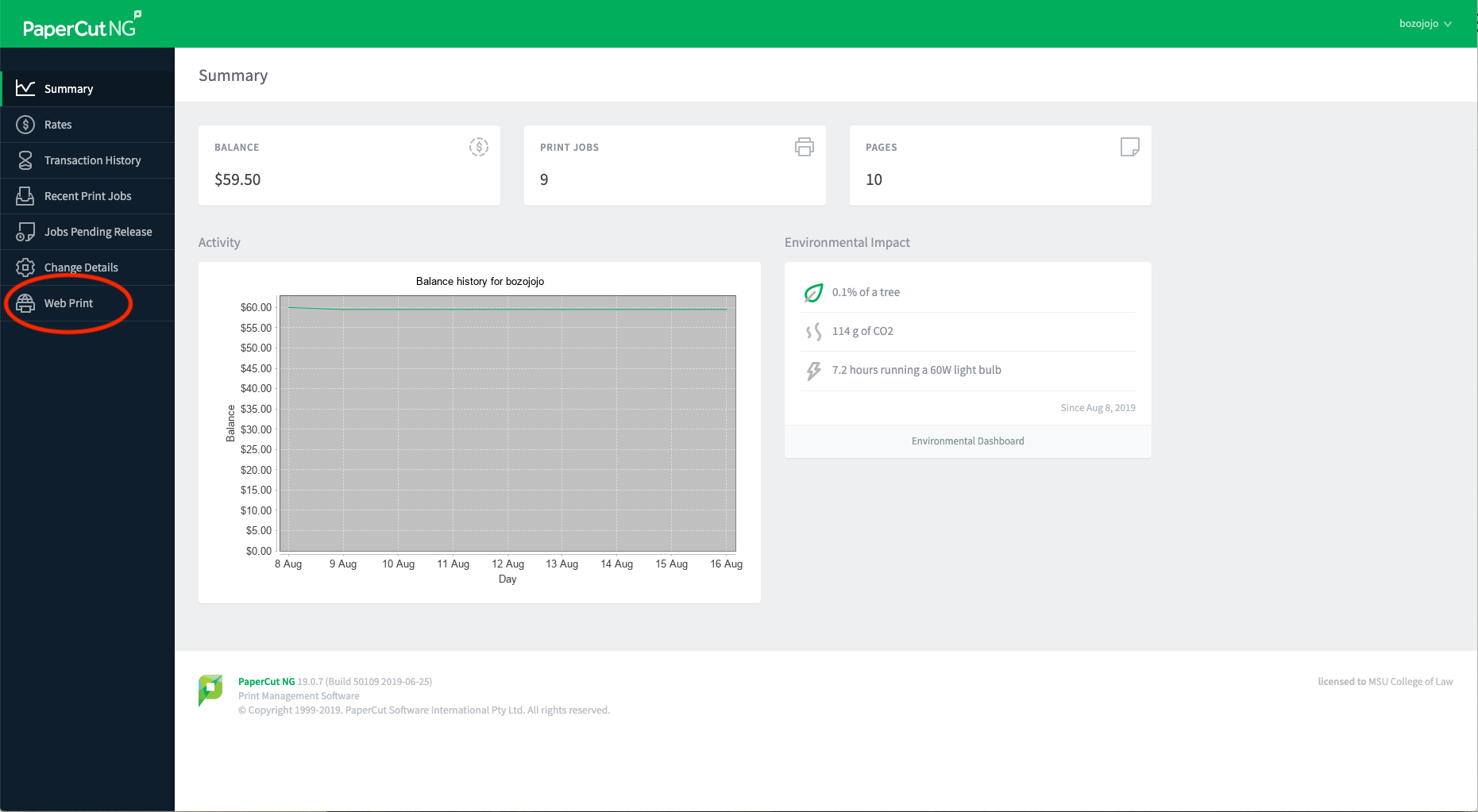
    Choose Webprint
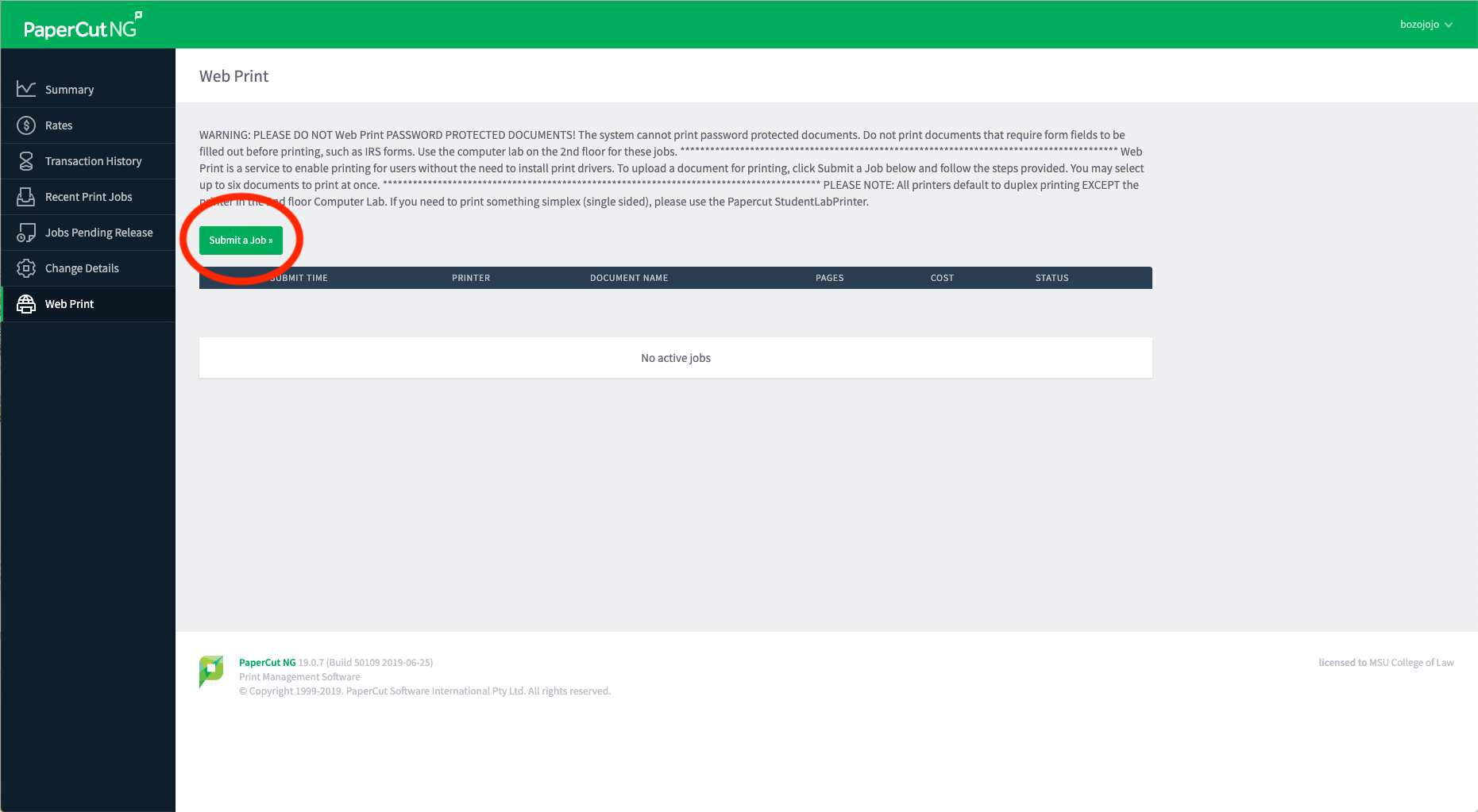
  5. Click Submit a Job.
    Click Submit a Job
     
  6. Select the desired printer. **all printers default to duplex printing except Student Lab Printer
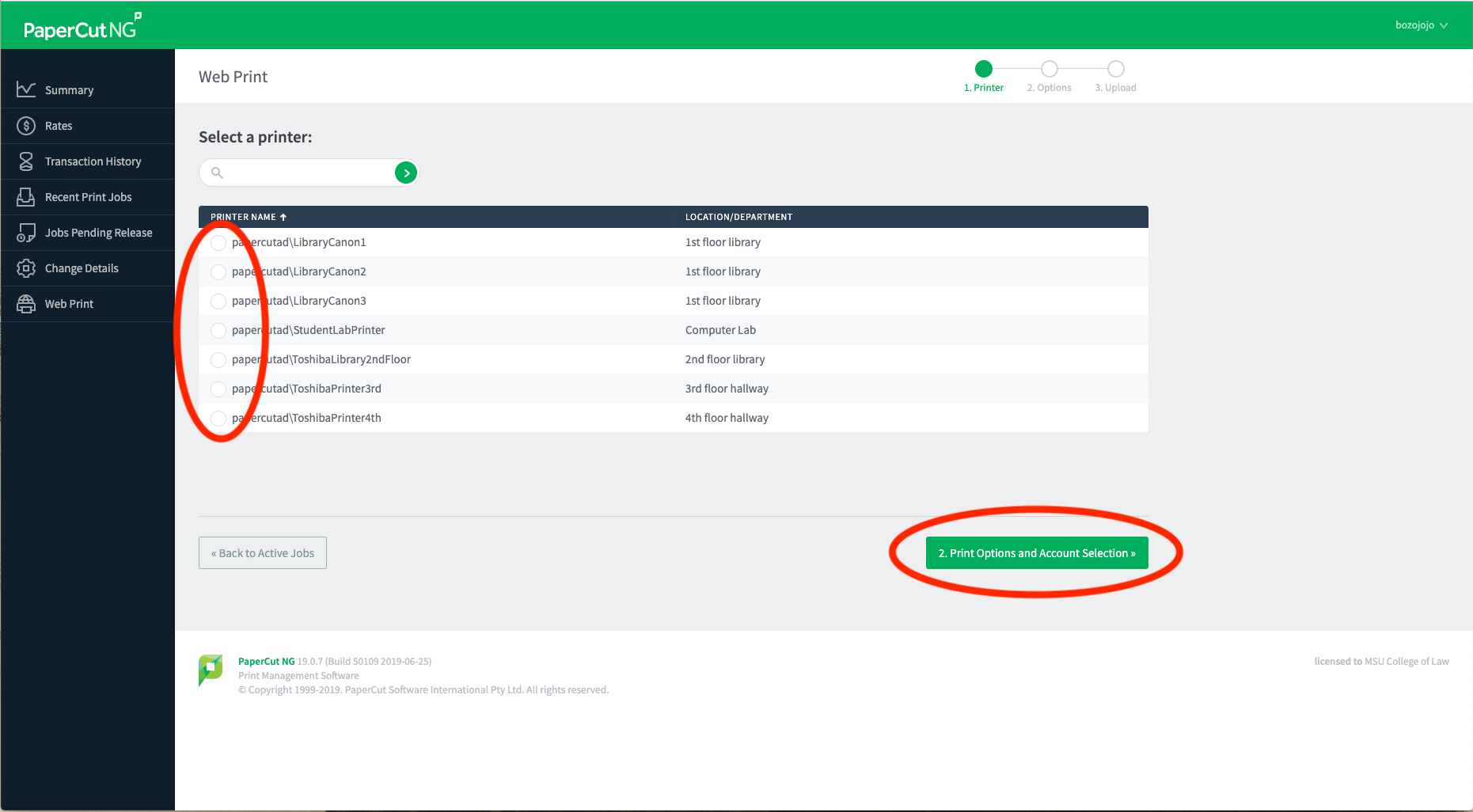
    Choose Printer
     
  7. Click Print Options and Account Selection.
  8. Enter the number of copies you’d like printed, click Upload Documents.
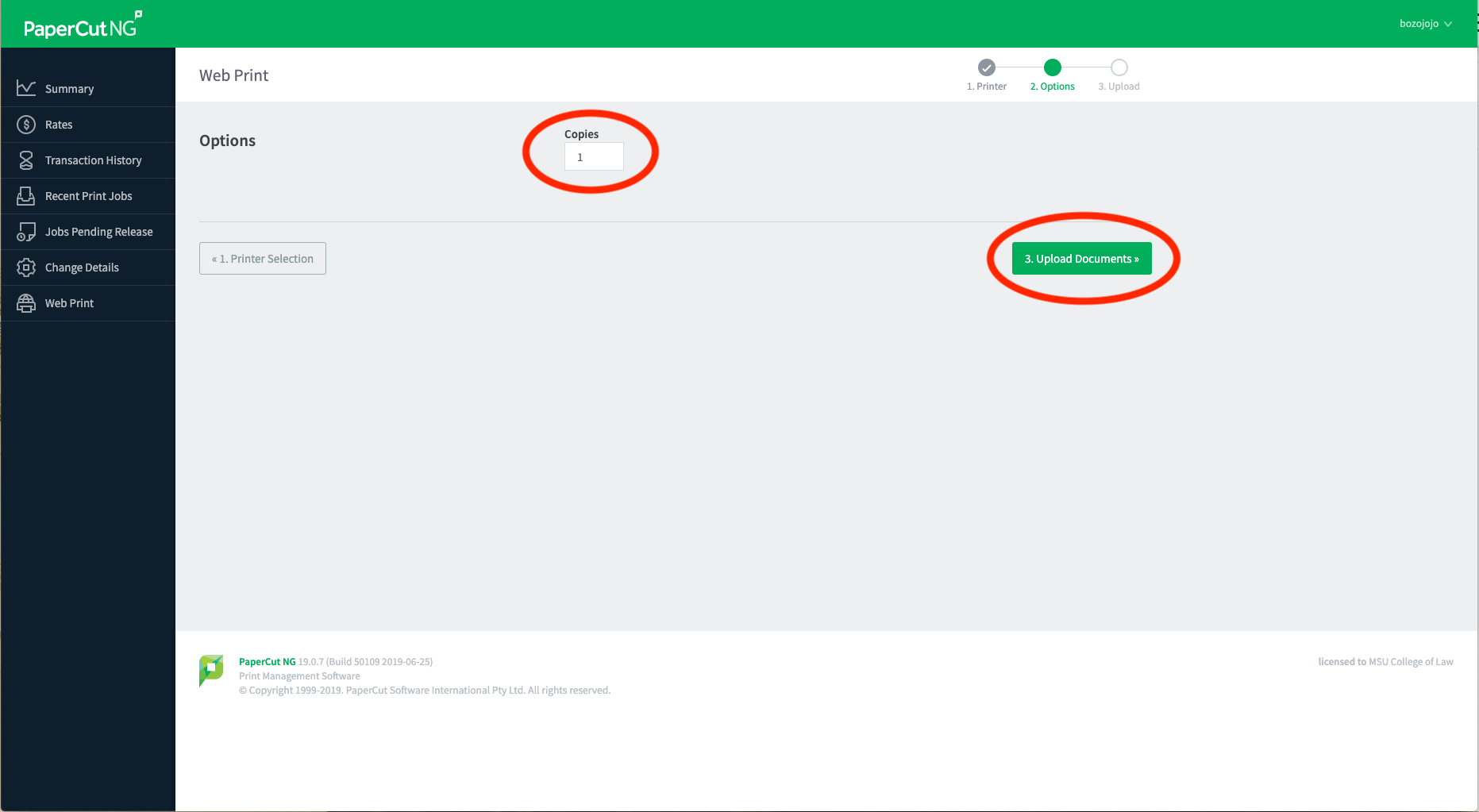
    COPIES
     
  9. Click Upload from Computer to open a file window and choose the file to be printed. **The file CANNOT be an image file (JPG, PNG, TIFF, GIF). If you need to print an image, please convert it to a PDF or use the computer lab.
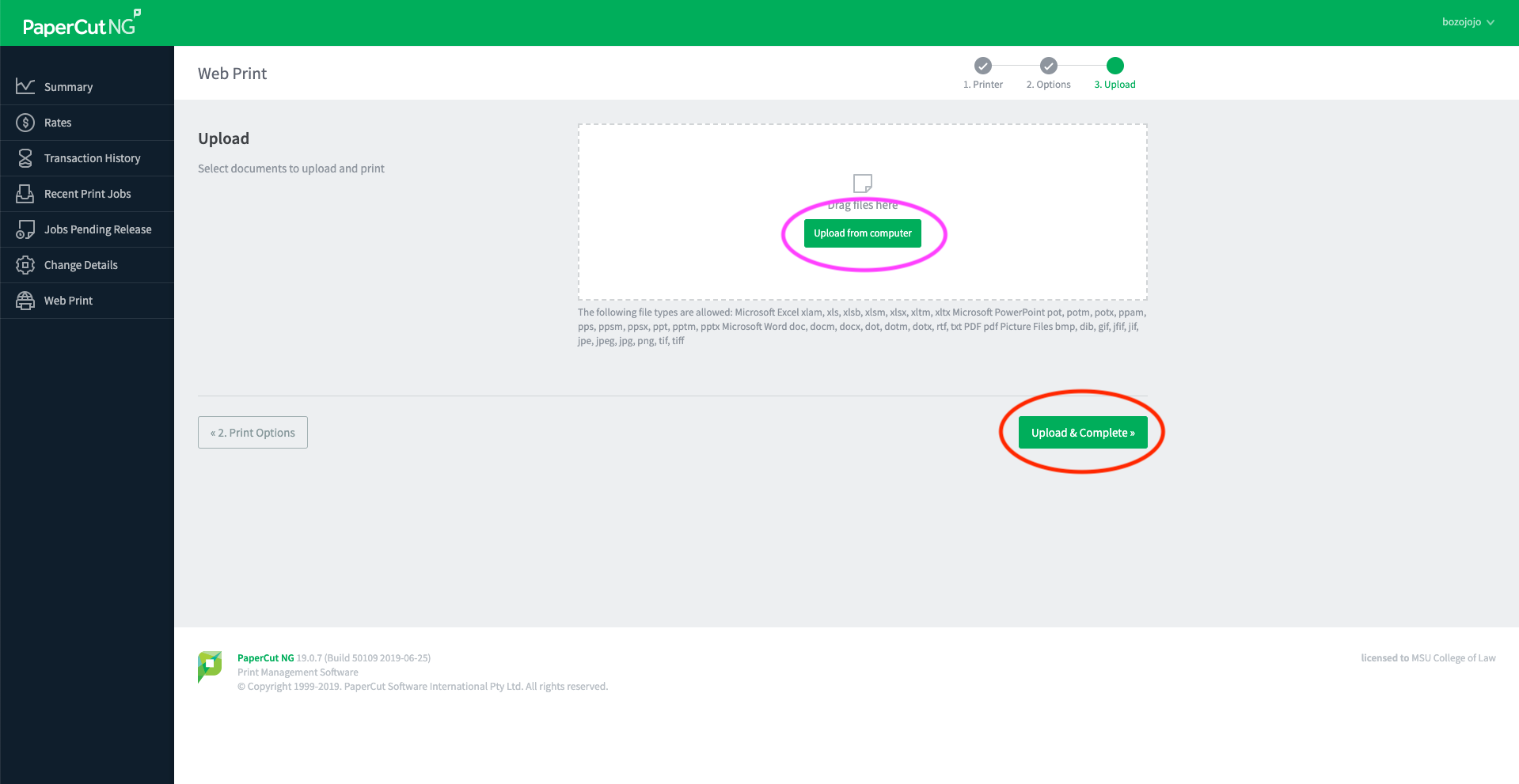
    Upload Doc
     
  10. Click Upload and Complete to print the files. The job will render and then show as finished once printed.
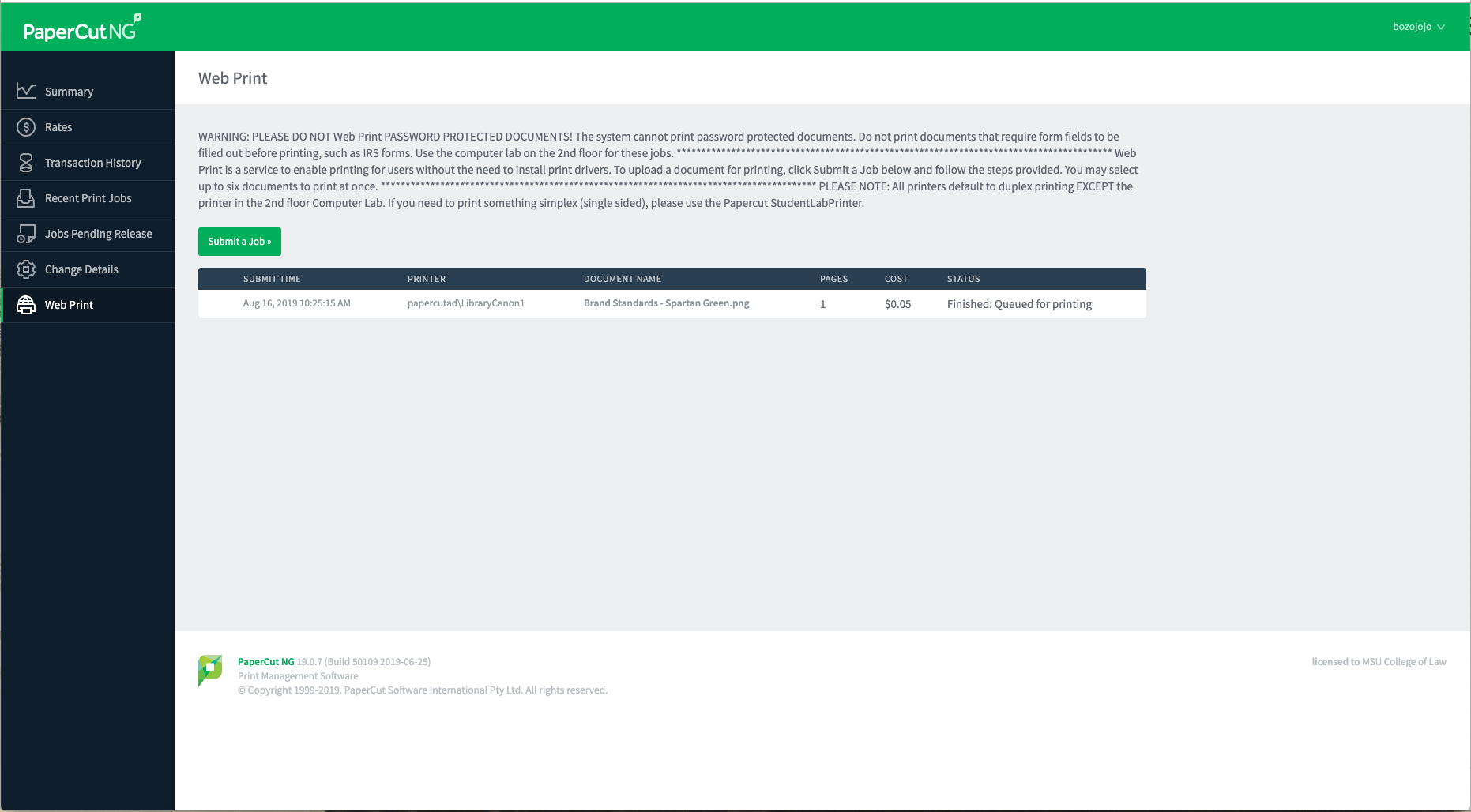
    Finish
ExamSoft Downloads and Computer Requirements

ExamSoft Download Site

SofTest can be used on most modern Microsoft Windows based computers (i.e. purchased within the last 3-4 years). Please see specific system requirements as noted below.

SofTest cannot be used on virtual operating systems such as Microsoft's Virtual Machine, Parallels, VMware, VMware Fusion or any other virtual environments.

Review Best Practice for Exam-Takers »

Review Minimum System Requirements »

Classroom & Event Calendar View

Viewable via Student Services »

About

  • Overview
  • Why MSU Law
  • Campus Map
  • Visit
  • Directory
  • History
  • Consumer Information (ABA Required Disclosures)

Academics

  • Degrees & Programs
  • JD Degree Programs
  • Concurrent Degree Programs
  • Masters & Non-Degree Programs
  • Experiential Learning

Admissions

  • Student Life
  • Cost & Financial Aid
  • Preparing for Law School
  • Request a Viewbook

Clinics, Centers & Institutes

  • MSU Law Clinics
  • MSU Law Centers
  • MSU Law Institutes

News & Events

  • News
  • Events
  • Press
  • Meet the Team

Careers

  • Career Services Office
  • Employment Statistics
  • Schedule an Appointment
  • Student & Alumni Resources

Contact us

517-432-6800

Address

Michigan State University College of Law 648 N. Shaw Lane East Lansing, MI 48824-1300

Releases and Statements

Follow Us

  • MSU Law Facebook Channel
  • MSU Law Twitter Channel
  • MSU Law Instagram Channel
  • MSU Law LinkedIn Profile
  • MSU Law Youtube Channel

If you're having accessibility issues, please let us know.

Know More: Campus Safety Information and ResourcesTransparency Reporting: Budget & Salary/Compensation
  • Contact Information|
  • Site Map|
  • Privacy Statement|
  • Site Accessibility|
  • Call MSU: (517) 355-1855|
  • Visit: msu.edu|
  • Notice of Nondiscrimination|

SPARTANS WILL|© Michigan State University|